
TGA Data Reporting is Now Adonis — Manual or Automatic, Your Choice
Within the Ministry of Culture and Tourism TGA (Turkish Tourism Promotion and Development Agency)collects tourism statistics data from accommodation facilities regularly every month. To facilitate this legal obligation. To Adonis Hotel Management Web Edition we added direct TGA integration.
No external systems, no separate inputs. Everything from your Adonis panel.
Two Methods, Complete Control
Manual transmission: Go to the Tourism Statistics screen from the Reports menu. Select a period and click the "Report" button — your data will be instantly transmitted to TGA. You can also use it for all previous periods, starting from the previous month.
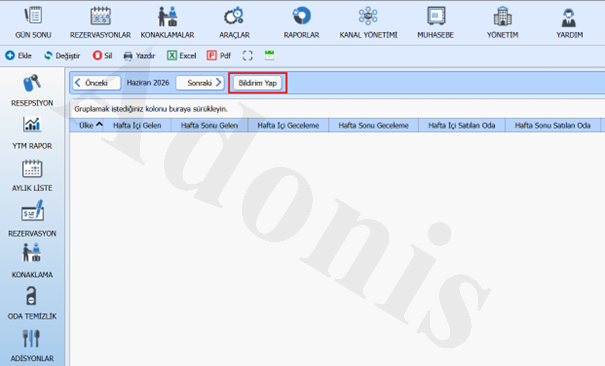
Auto send (recommended): Set it once, and on the 5th day of each month, the system will activate and send the data on your behalf. There will be no need to make manual notifications every month.
How to Install? Just 2 Steps
Step 1 — Complete City and County information
Management → Facility Information Enter the tab. Make sure the City and County fields are selected. The TGA system requires this information for authentication; if left blank, the transmission will not occur.
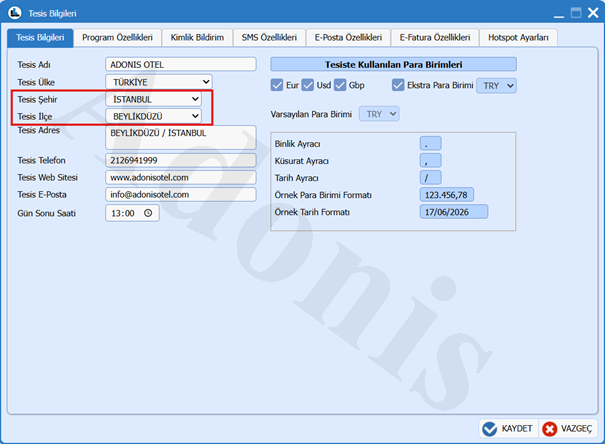
Step 2 — Select sending mode
Administration → Program Features Enter the “section” at the bottom of the page. Auto Send TGA Information Check “. If you do not prefer automatic submission, leave this box blank; you can manually submit the data yourself each month.
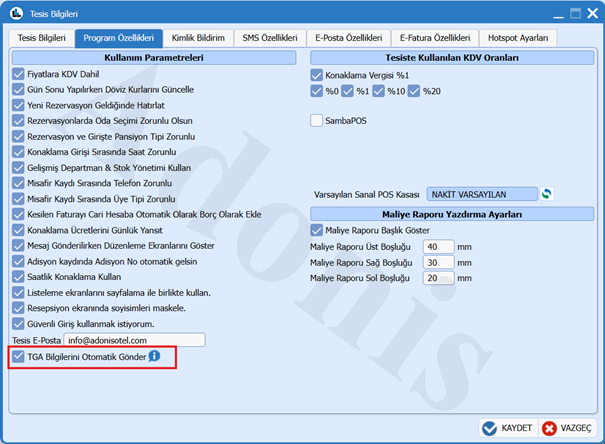
Track Your Posts
On the same screen — Reports → Tourism Statistics —all your past notifications Notification Date and Notification Reference Number You can see it with. It is now clear at a glance which month has been sent or not.
Technical Documentation
To the official TGA integration guide you can reach here. If you encounter any problems during installation, our support team is available by phone and live chat.
Adonis Hotel Management Technologies Team